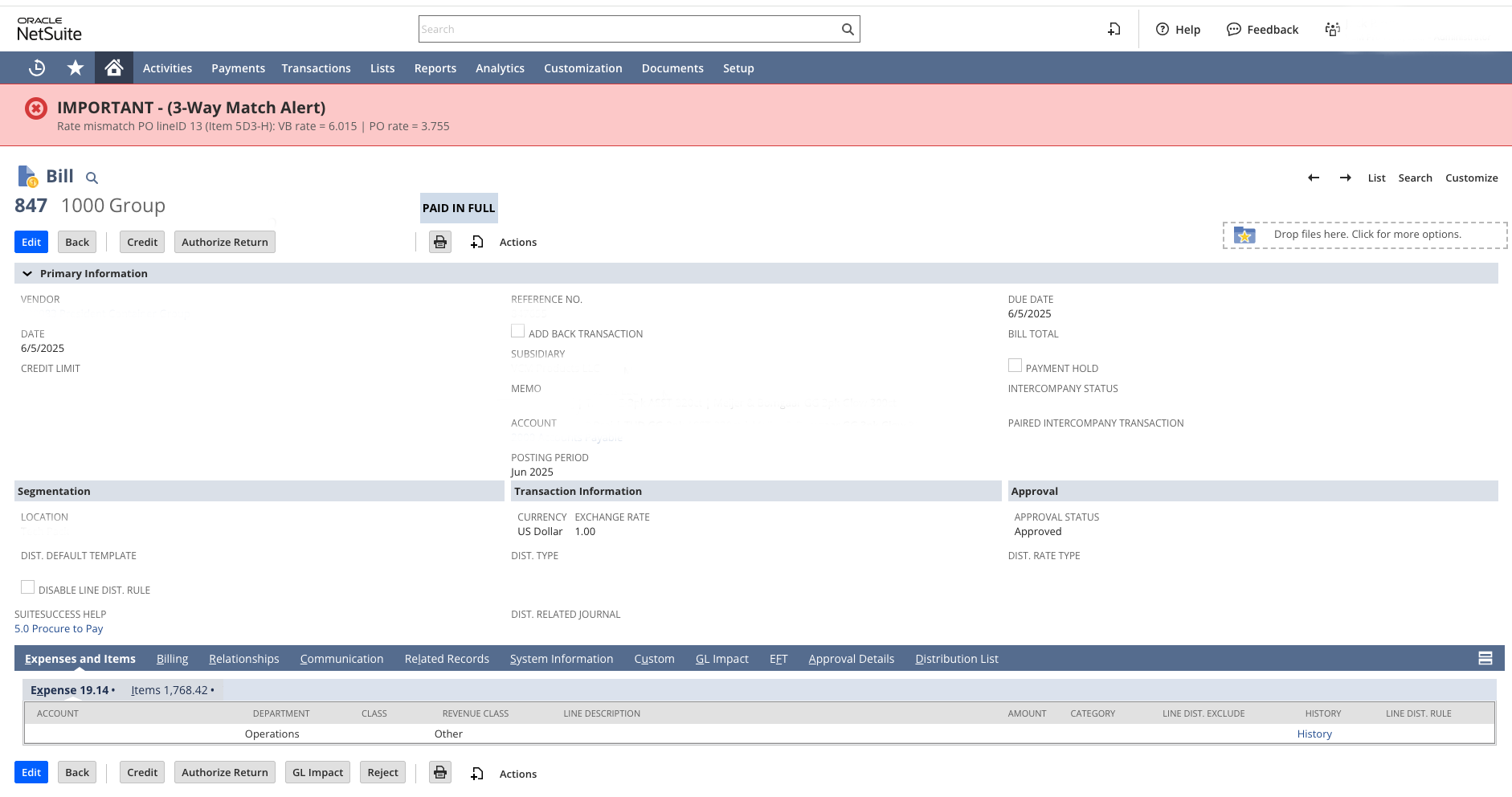
After testing NetSuite’s native 3-Way Match Workflows, our client decided they only needed an immediate alert users when a Vendor Bill doesn’t align with its Purchase Order or Item Receipt. We built a lightweight, native solution that runs automatically, displays a banner on the record, and emails the right people to follow up all in just a few lines of code. This solution is focused on item rate matching.

We recently built a NetSuite application for one of our clients to solve a common but important challenge, maintaining a reliable three-way match between Vendor Bills, Purchase Orders, and Item Receipts.
The client had evaluated NetSuite’s native 3-Way Match SuiteApp in their sandbox but ultimately decided they wanted something much simpler. What we implemented instead was a lightweight, purpose-built solution that came together in just a few lines of code and hit their mark perfectly.
The goal wasn’t to build another audit module. It was to create something that:
At Left Ledger, we start with a straightforward design paradigm: one script type per record.
In this case, we leveraged our existing User Event script on the Vendor Bill record—named cleanly and consistently, like LL | UE | VB.
That structure makes it easy for any administrator or developer to understand where automation lives and how it ties to business processes.
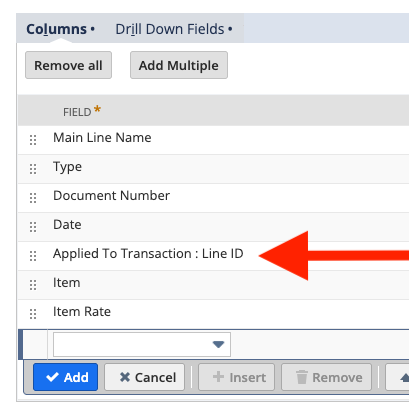
One of the most useful discoveries in this project came from recognizing the power of NetSuite’s Applied To Transaction : Line ID field.
When the Vendor Bill is created from the Purchase Order itself, that field quietly links each Vendor Bill line back to the originating Purchase Order or Item Receipt line. Once we tapped into it, we could directly compare rates and quantities with precision, without complex joins or workarounds.
To validate the concept, we first modeled the logic using a simple Saved Search in the UI, adding fields like Document Number, Item, Item Rate, and the Applied To Transaction : Line ID.
Once that worked exactly as intended, we converted it to a scripted version.
The finished solution now runs automatically when a Vendor Bill is saved.
It:
For finance leaders, this kind of approach strikes the right balance between control and simplicity:
Sometimes the most effective solutions in NetSuite are the ones that stay close to its core. By leveraging the data already available and adding just the right amount of scripting, we gave the client a solution that’s clear, simple, and actionable, exactly what they wanted.
...
And why most teams don’t see it coming. Go-live is not the finish line. It is the moment NetSuite is finally exposed to real behavior. This is where the system either proves itself or quietly begins to break. Not because NetSuite is flawed, but because the guardrails were never fully set.
After testing NetSuite’s native 3-Way Match Workflows, our client decided they only needed an immediate alert users when a Vendor Bill doesn’t align with its Purchase Order or Item Receipt. We built a lightweight, native solution that runs automatically, displays a banner on the record, and emails the right people to follow up all in just a few lines of code. This solution is focused on item rate matching.
Most teams eventually look at Unit of Measure in NetSuite and think they are missing something. The system supports it, it looks more structured, and it feels like the "right" way to do it.
In practice, expanding Unit of Measure often shifts complexity into every transaction instead of removing it. What looks like precision at the system level can quietly introduce friction across order entry, warehouse execution, and financial reporting.