This article article is relevant to you if you are running your business on Oracle NetSuite ERP and would like a quick roadmap to simplify and add more transparency to your accounts payable process.
If your business is running on Oracle NetSuite ERP and you have an interest in recording and tracking deposit amounts paid to vendors before they accept a purchase order for goods or services, then enabling the vendor prepayments feature could be an easy home run. You can apply the prepayment amounts created with this feature against open bills for the vendor. Vendor prepayments enables you to record and track multiple prepayments and prepayment applications for all vendors.
Step 1. From the Administrator role, Setup > Company > Enable Features. Under the Accounting sub tab, Basic Features heading, make sure that the A/P box is ticked, Advanced Features heading tick the Vendor Prepayments box and Save.
Step 2. You can configure a default Vendor Prepayment account (new or existing Other Current Asset type) on a per subsidiary basis: Setup > Company > Subsidiaries, edit and under the Preferences sub tab, General area look for Vendor Prepayment Account dropdown.
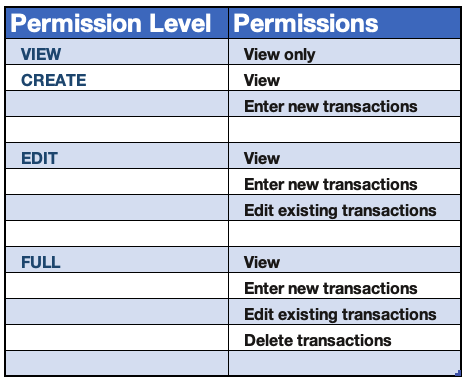
Step 3. Go to each necessary user role (typically A/P Clerk, Controller, CFO) and set access. Setup > Users/Roles > Manage Roles. Under Permissions sub tab, Transactions sublist, add the following records: Vendor Prepayment (lets user of the role work with the transaction), Vendor Prepayment Application (lets the user of the role apply the prepayments). Choose a level of permission for each of the two records.
Step 4. Go to your Purchase Order transaction entry form, hover over the Customize link and click Customize Form. Under the Actions sub tab tick the "show" box for the Enter Prepayment button and you're off.
...
This article is relevant to you if you are running your business on Oracle NetSuite and would like to add an isolated custom note on a transaction line. This article demonstrates a simple end to end architecture to customize and extend the capabilities of NetSuite.
Most teams eventually look at Unit of Measure in NetSuite and think they are missing something. The system supports it, it looks more structured, and it feels like the "right" way to do it.
In practice, expanding Unit of Measure often shifts complexity into every transaction instead of removing it. What looks like precision at the system level can quietly introduce friction across order entry, warehouse execution, and financial reporting.
If you’re a finance professional using Oracle NetSuite ERP to run your business, this post is for you. NetSuite's native flexibility lets you extend, refine, and automate your financial close processes - no third-party licensing, no extra overhead. When properly tailored, it becomes more than an ERP, it becomes the exact tool your team needs to close faster and cleaner every month.
If you are a CFO, Controller, or finance leader running on Oracle NetSuite, this conversation is worth your attention.
Reimplementation is not about dissatisfaction with the platform. It is about alignment. Over time, licensing structures expand, add-ons accumulate, transaction tiers shift, and renewal cycles become routine rather than strategic. What once made sense at go-live may no longer reflect how your business operates today.
Handled correctly, renewal can become an opportunity to reset cost trajectory, restore leverage, and reestablish long-term predictability in total cost of ownership.